Yes — Shotshot is now open source. As of September 21, 2026, the desktop app lives in a public repository under the MIT license: the infinite canvas, the built-in agent, the BYOK generation pipeline, all of it. Version 0.1.0 is tagged and the code builds and runs today. This post explains what exactly opened, what the paid plans still sell, and the reasoning — because “local-first, bring your own key” is easy to say and, we think, should be possible to verify.
What just opened
The repository is github.com/rendylong/shotshot.ai, MIT-licensed, with v0.1.0 — the initial open-source release tagged on September 21, 2026. In one sentence, it is an open-source desktop app that turns 3D models into product images and videos — locally, with your own API keys.
What that means concretely:
- The whole client is in the repository — a TypeScript codebase (Electron + React + Vite) covering the canvas UI, the agent that runs on it, and the generation pipeline that talks to model APIs.
- It builds and runs today, three ways: a web renderer on Node.js 22+, the Electron desktop app, and a Docker Compose setup for self-hosting. The Docker image serves the client statically; generation requests go from your browser directly to the provider you configure.
- The binary releases remain the easy path. If you would rather not build from source, the signed installers for macOS, Windows, and Linux are on the download page — same code, packaged.
The open-source page tracks the license and repository links, and will stay the canonical place for source-availability status.
Why we opened it
The honest reason is that our two trust claims only fully work if they are checkable.
Shotshot’s pitch to product designers and e-commerce teams has two load-bearing promises: local-first (projects and assets stay on your machine by default) and BYOK (generation runs through the image-model API you configure, with keys stored only on your device). Both are answers to a real anxiety — unreleased products and brand assets moving through other people’s clouds — and both are, from outside a closed app, just words. A closed binary that says “your data never leaves this machine” asks you to trust a marketing sentence. An open repository lets you read the request path instead.
There is also a strategic bet, and we might as well state it plainly: our defensibility is not in the client code. If someone reads this repository and rebuilds the workflow, that is a compliment, not a loss — the durable parts of this product are the workflow design, the pace of iteration, and the services around it. Most AI product-image tools in this space are closed SaaS; we think there is room for one honest open client, the same way the local-AI community has room for open tools that closed vendors said were impossible to sustain.
What’s in the repository
Beyond the license, three things in the codebase are worth knowing about before you clone:
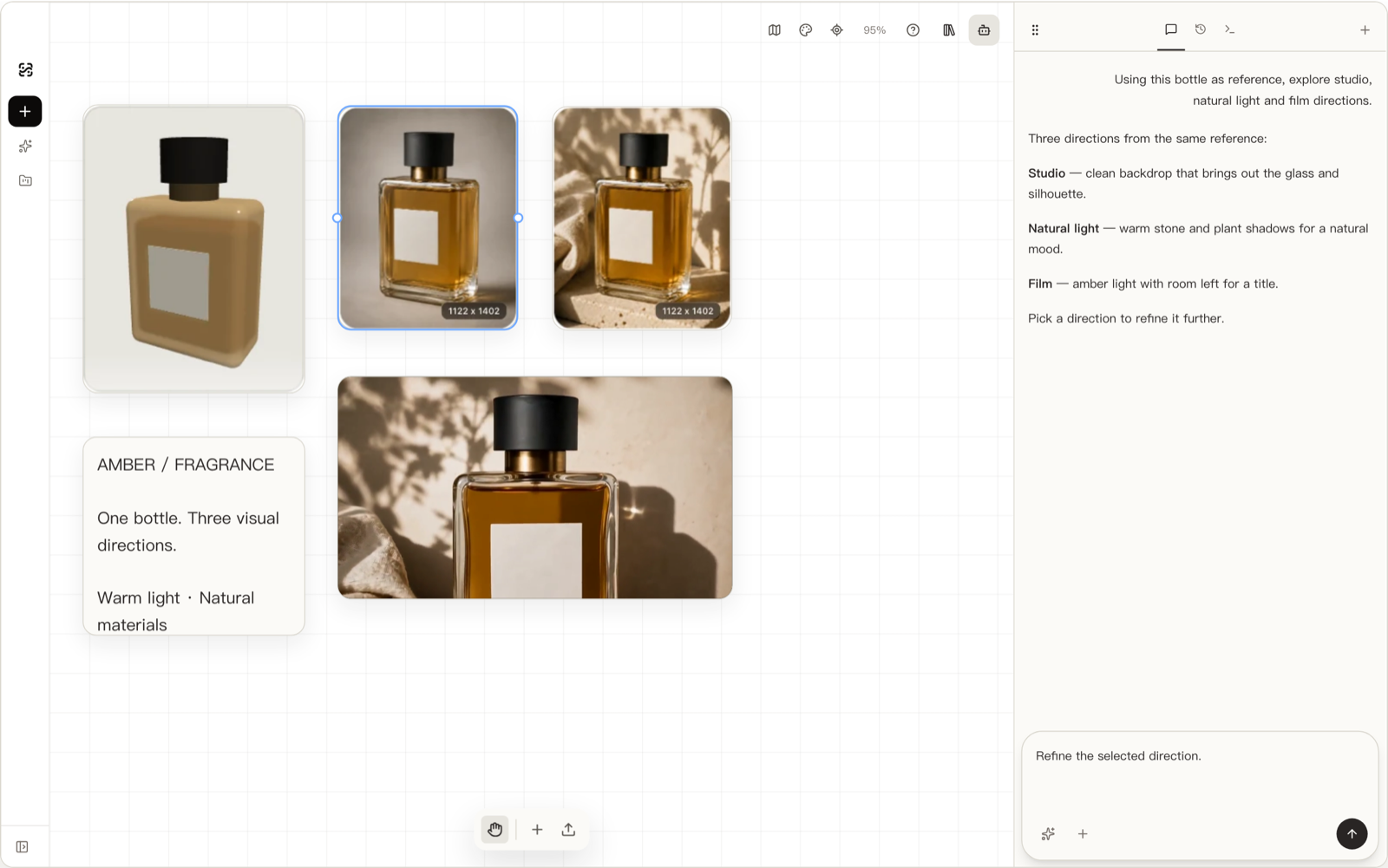
The canvas is the product. Shotshot is built around an infinite canvas where image, text, video, audio, and 3D-model nodes can be placed, scaled, and connected — generation becomes iteration rather than one-shot rolls. The product-photo workflow we write about — import a GLB/glTF model, capture views, generate against them — is one deliberate path through that canvas, walked end to end in How to Turn a 3D Model into Product Photos.
The agent runs locally and understands the canvas. It can generate nodes, organize layouts, and chain steps on the canvas you have in front of you — including proposing and refining visual directions from a single 3D reference. Its system is in the repository, so you can audit what it can and cannot touch.
BYOK is first-class, not a hidden menu. Open the model settings, add any OpenAI-compatible channel (base URL + key), or pick a preset: DeepSeek, Moonshot, MiniMax, Zhipu, OpenRouter, fal.ai, and others. Keys are stored only on your device; the desktop app proxies cross-origin requests through its main process when needed — and there is no server of ours in the path. Desktop users can also sign in with a ChatGPT subscription and call models directly, no separate key required.
Two more honest notes, because an announcement that reads like a launch brochure is worthless:
- This is 0.1.0, not 1.0. Local data formats are still evolving and backward compatibility is not yet guaranteed — the README says so, and so will we: don’t keep the only copy of important work inside the app yet. Point-in-time honesty is part of the deal.
- Stars are not the metric. The repository opened days ago. What we care about is whether the workflow serves real product work, and the write-ups hold up under scrutiny.
What open source does not mean
Scope boundaries, so nobody is misled:
- Open source ≠ no services. The hosted LLM gateway and account features are operated services, not part of the client repository. They are optional by design — BYOK users never touch them.
- MIT ≠ maintained-by-you-is-our-problem. Contributions are welcome (issues, PRs, and roadmap discussions all live in the repository), and we review them, but the project’s direction stays with the team that ships it.
- Open client ≠ every component open. The client is what generates your images and holds your projects — that is what needed auditing, and that is what opened. Third-party model APIs it talks to remain whatever their providers are.
How the paid plans fit
The pricing question gets a direct answer: the client being open source changes what you can verify, not what you pay for.
The free tier includes the full canvas and 100 credits a month through the hosted gateway — plus BYOK, which is free by construction since you pay the model provider directly. Standard ($19/mo) and Pro ($79/mo) exist for people who would rather not manage API keys at all: they buy hosted-gateway credits (2,000 and 8,000 per month respectively), more devices, and support priority, as of 2026-09. No canvas feature sits behind those tiers. If your preference is your keys, your machine, your models — the open client is the whole product, and that is a supported way to use it, not a loophole.
Get involved
If you build product imagery from 3D models — or want a local-first AIGC canvas to build something else on — the shortest path is the download page for the packaged app, or the repository’s Quick Start to run from source. Bug reports with reproduction steps, workflow write-ups, and PRs are all useful; the issues tab is the right venue. And if you find a claim on this website that the code doesn’t back — the local-first behavior, the key storage, the request path — that’s exactly the kind of issue worth filing. That’s rather the point of opening it.
Frequently asked questions
The short version: MIT-licensed and free including commercial use; the client is what opened, hosted services did not; paid plans buy convenience (hosted credits, devices, support), not features; and the data story is unchanged — local by default, and verifiable now.