Yes — you can write product photo prompts that keep your product’s shape and logo intact, and the techniques are learnable in an afternoon. The core move is counterintuitive: a faithful product prompt describes almost everything except the product. You hand the model the world around your product — background, surface, light — and turn the product facts themselves into short, checkable constraints. This guide gives you the seven techniques that matter, the prompt skeletons to copy, and — just as important — the honest point at which no prompt can save the shot, and what to do instead.
This is the prompt-side deep dive of the workflow covered in How to Turn a 3D Model into Product Photos, and it applies regardless of which tool from our AI product photography tools comparison you run it in — the anatomy of a drifting prompt is the same everywhere.
Why prompts drift in the first place
Before the techniques, thirty seconds of mechanism — because every rule below falls out of it.
A text-to-image model generating “a matte-black wireless earbud case with a USB-C port” has no access to your earbud case. It has the string, and a training distribution full of plausible earbud cases. Its job — literally its training objective — is to produce an image that matches the description, and a thousand products match that description. The port comes out a few millimeters wide, the lid seam crosses the logo, the corner radius rounds off. None of that is malfunctioning; from the model’s point of view it did exactly what was asked.
This has a hard consequence for product work: adding more product detail to a prompt makes the output more specific, not more faithful. You are steering toward a narrower neighborhood of plausible products — you are not pointing at your product, because a description is not a pointer. The failure surface concentrates in exactly the places customers actually look: logos, button counts, seam lines, text.
So the prompt strategy writes itself: spend your prompt budget on the scene (where the model is genuinely good and instructions transfer cleanly), spend your constraint budget on the few product facts that must not move, and when that isn’t enough — and for serious catalog work it eventually isn’t — move the shape out of the prompt entirely, into a reference. More on that last step after the techniques.
Seven techniques that keep shapes honest
1. Describe the world, not the thing
The single highest-leverage habit. Your scene prompt should read like a photography brief for a shooter who already has the product on the table: “studio white background, soft gradient falloff, soft shadow pooling under the base, top-left key light, product centered with generous negative space.” Notice what’s absent: any re-description of the product.
When you re-describe the product in the prompt — “a sleek matte-black case with rounded corners” — every adjective becomes a re-roll of the geometry. The model hears “sleek” and “rounded” and adjusts the shape to match the words, overriding whatever was anchoring it. If a reference image is in play, product adjectives in the prompt fight the reference. Keep product vocabulary out of the scene prompt except where you are deliberately changing a finish (technique 3).
2. Constrain what must not move — in checkable terms
Where the product must appear, use constraints a grader could verify, not adjectives: “the embossed logo stays centered on the front face, unobstructed”, “exactly two buttons on the top edge, visible”, “proportions of the body unchanged”. Each one is a statement a reviewer could mark right or wrong against the real product — that’s the test. “Photorealistic, accurate, high quality” are not constraints; they’re mood words, and they do nothing for the seam line.
This is also how to write useful negatives. “No distortion” names nothing. “Do not add or remove buttons; no extra text or watermarks; logo not tilted or stretched” names checkable failures — see the FAQ for why negative lists should stay short.
3. Separate material from light
Materials belong to the product; light belongs to the scene. Mixing them is the most common way prompts accidentally reshape things: “glossy white ceramic catching warm golden-hour rays across its curves” makes the model re-sculpt surfaces to have something for the light to catch. Write them as two slots:
- Material (product fact, change rarely): “matte polycarbonate body, brushed aluminum ring”
- Light (scene decision, change often): “soft diffused studio light from upper left, gentle shadow under the base”
Now iterating the mood is a light-slot edit that leaves the geometry alone — which also makes your catalog consistent (technique 6).
4. Give the logo a job description
A logo survives when the prompt tells the model where it is, how big, and under what light: “the printed logo sits centered on the front face at about 8% of the product’s width, evenly lit, no glare”. Position and relative size the model can usually honor.
Set expectations honestly here: fine text is the weakest input in current image models. Letterforms at small sizes blur and drift no matter how well you prompt. Two workarounds that actually work — keep in-frame text minimal and camera angles close-frontal when the logo matters, and restore small logotype in post. The full fix is reference input, covered below.
5. Anchor proportions with a comparison
Models handle relative statements better than absolute ones. “Camera at three-quarter view, slightly above product height” beats “50mm lens, 45 degrees” for composition control, and “the product occupies about 60% of frame width” beats pixel dimensions. The frame-share statement is quietly load-bearing: it prevents the crop-tight-then-invent-borders failure, the same reason you leave negative space when framing a photo.
6. Template the prompt for the whole catalog
Consistency across a catalog is a prompt architecture problem, not a willpower problem. Fix a skeleton and vary only its slots:
[ANGLE] product shot of the product,
on [SURFACE], against [BACKGROUND],
[LIGHT], [MOOD detail],
[LOGO/BUTTON constraints], frame share ~[N]%.
Every product in the catalog shares the same skeleton; the brackets change; the constraint line is copied verbatim from the product’s fact sheet. Because material and light are separate slots (technique 3), “the same lighting across forty SKUs” is one shared light string. This is also how you keep hero images coherent between last quarter’s shoot and this quarter’s.
7. Iterate one slot at a time
When a generation comes back wrong, resist rewriting the whole prompt. Change one slot — the light, the surface, the mood — and regenerate, comparing candidates side by side. Multi-slot rewrites make shape drift unattributable: you get a different image and no idea which word caused it. (If you’re working on a canvas with references and candidates laid out together, this comparison loop is exactly what it’s for.) One variable per roll is slower-feeling and strictly faster.
The honest ceiling of prompting
These techniques will noticeably reduce drift — and they will not eliminate it, because the ceiling is structural, not skill-based. A prompt cannot point at your product; it can only describe a neighborhood. Three situations where you should stop prompt-engineering and change inputs instead:
- Complex geometry. Multiple interfaces, asymmetric silhouettes, grill patterns, ventilation slots. The description needed to pin the shape is longer than the model can honor.
- The angle doesn’t exist in any photo you have. If the back or underside was never photographed, no prompt recovers it — a prompt-only model will invent it, confidently.
- Catalog-scale consistency. Twenty SKUs that must look shot in the same studio, with the logo surviving on every one. At that scale, per-image prompt heroics don’t scale; the anchor needs to be shared.
The structural fix: show, don’t describe
When the ceiling hits, stop improving the description and hand the model something to look at. Two tiers:
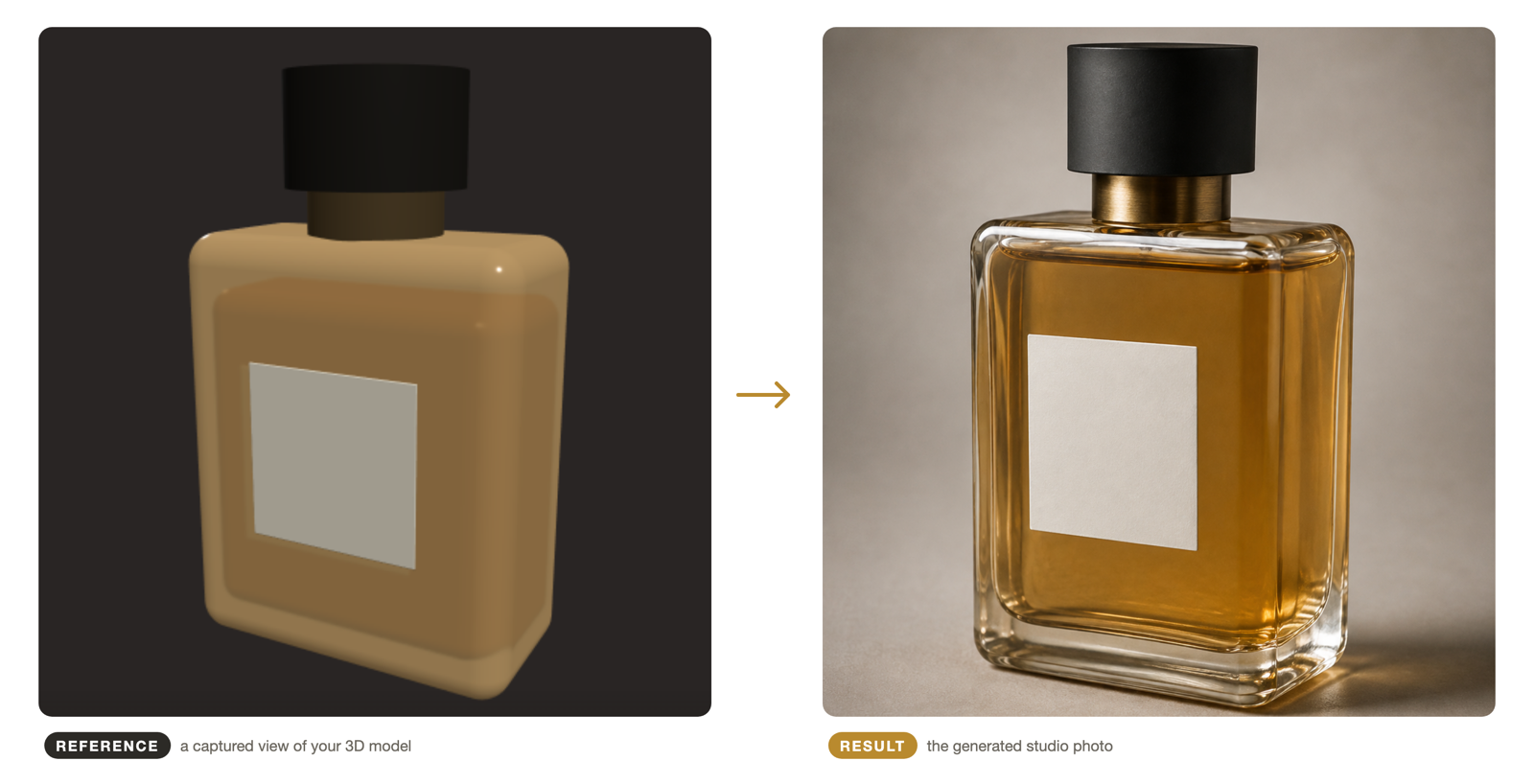
A product photo as reference — what most 2D AI product-photo tools are built around. The photo’s pixels become the ground truth, which bounds drift far better than text; the bound is the photo itself, so unseen angles and fine text still wobble. If photos are what you have, this is your tier, and our tool comparison covers the strong options.
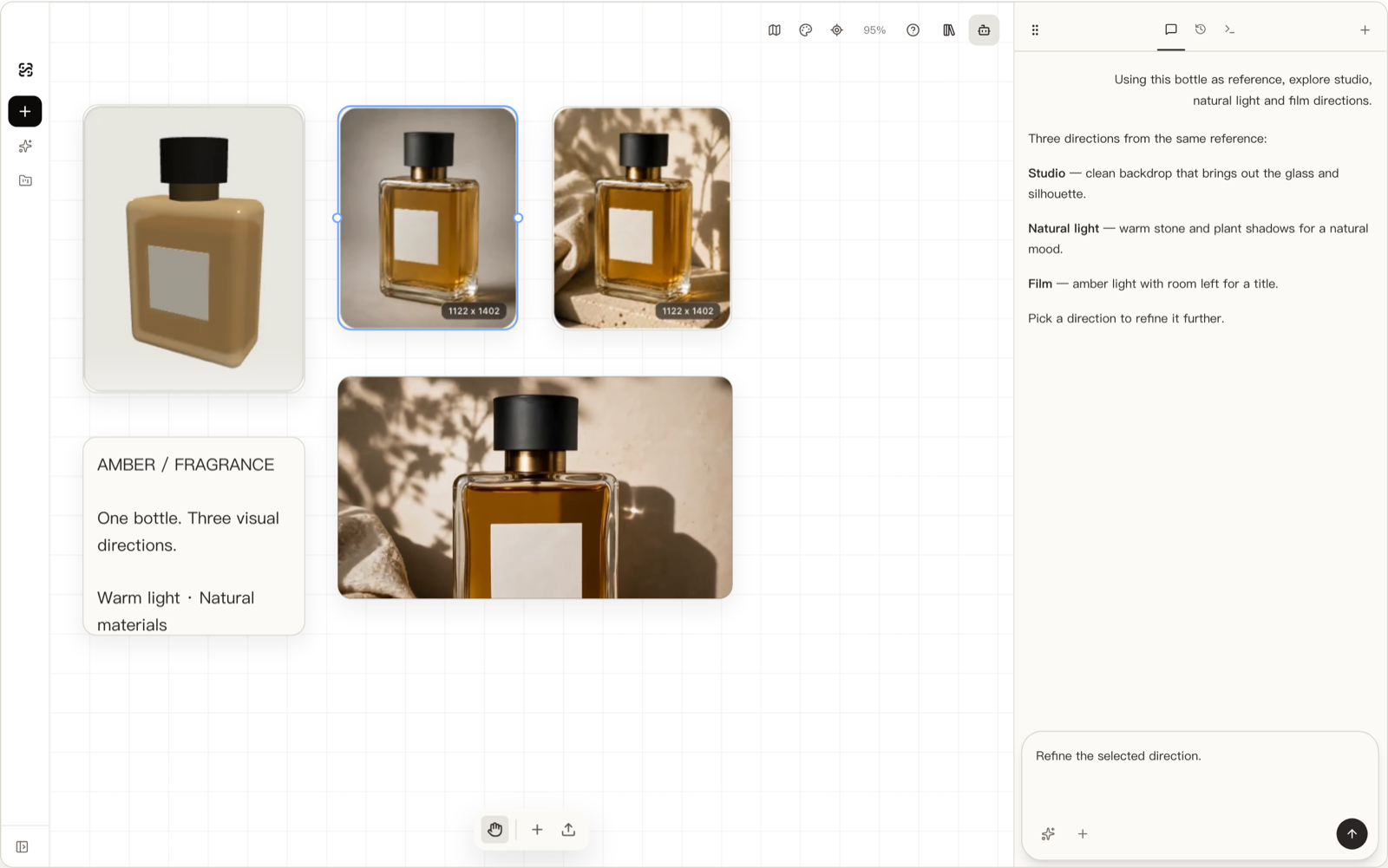
A captured 3D view as reference — the stronger anchor. If your product exists as a GLB/glTF model (from CAD, from your designer, before manufacturing), you frame the exact angle in an interactive 3D view and capture it; the generator receives an actual render of your geometry from that angle. The shape can’t drift because it was never described — and the prompt’s entire job becomes the scene, which is the one thing it’s excellent at. The full workflow — import, frame, capture, generate, iterate — is walked through in How to Turn a 3D Model into Product Photos, and it’s the same property that makes pre-manufacturing product images possible at all. If you’re new to 3D files, What is a GLB file? is the gentle on-ramp.
Common mistakes
Writing product adjectives into the scene prompt. Every one is a geometry re-roll. The scene prompt should describe everything around the product; the fact sheet handles the product.
Vague negatives. “No distortion, no artifacts, high quality” — none of it names a checkable failure. Write negatives like a QA checklist: buttons not added or removed, logo not tilted, no invented text.
Chasing a bad generation with prompt rewrites. If the shape is wrong, more words rarely fix it — that’s the reference’s job. Diagnose first: geometry problem → fix the reference or the framing; scene problem → fix the prompt. Prompting harder at a geometry problem is the classic sunk-cost loop.
Iterating without comparison. Generating one image, tweaking, generating another, and judging from memory. Candidates must sit side by side with the reference, or “better” is a feeling, not a finding.
Rewriting the prompt per SKU. If each product gets a freshly-composed prompt, your catalog inherits twenty different lighting philosophies. The skeleton-and-slots template (technique 6) is the difference between a catalog and a collage.
Frequently asked questions
The compressed version: prompts drift because a description isn’t a pointer to your product; write the scene, constrain the checkable facts, template the skeleton, iterate one slot at a time; and when the shape truly matters — logos, unseen angles, catalog consistency — hand the model a reference instead, with a captured 3D view being the strongest anchor available. The expandable answers below cover each.